Changelog

Follow new updates and improvements to vCluster.

January 29th, 2026

vCluster

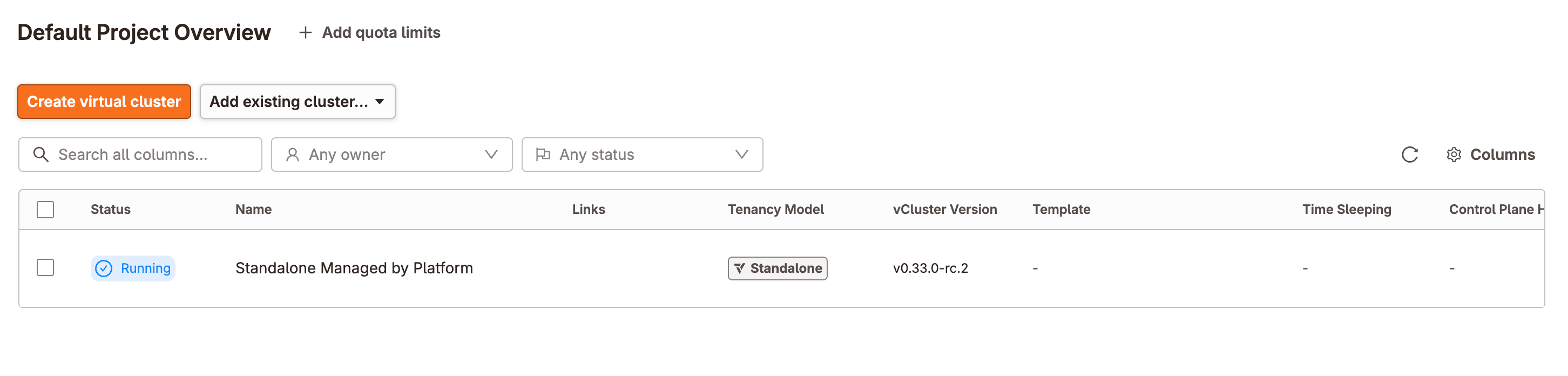
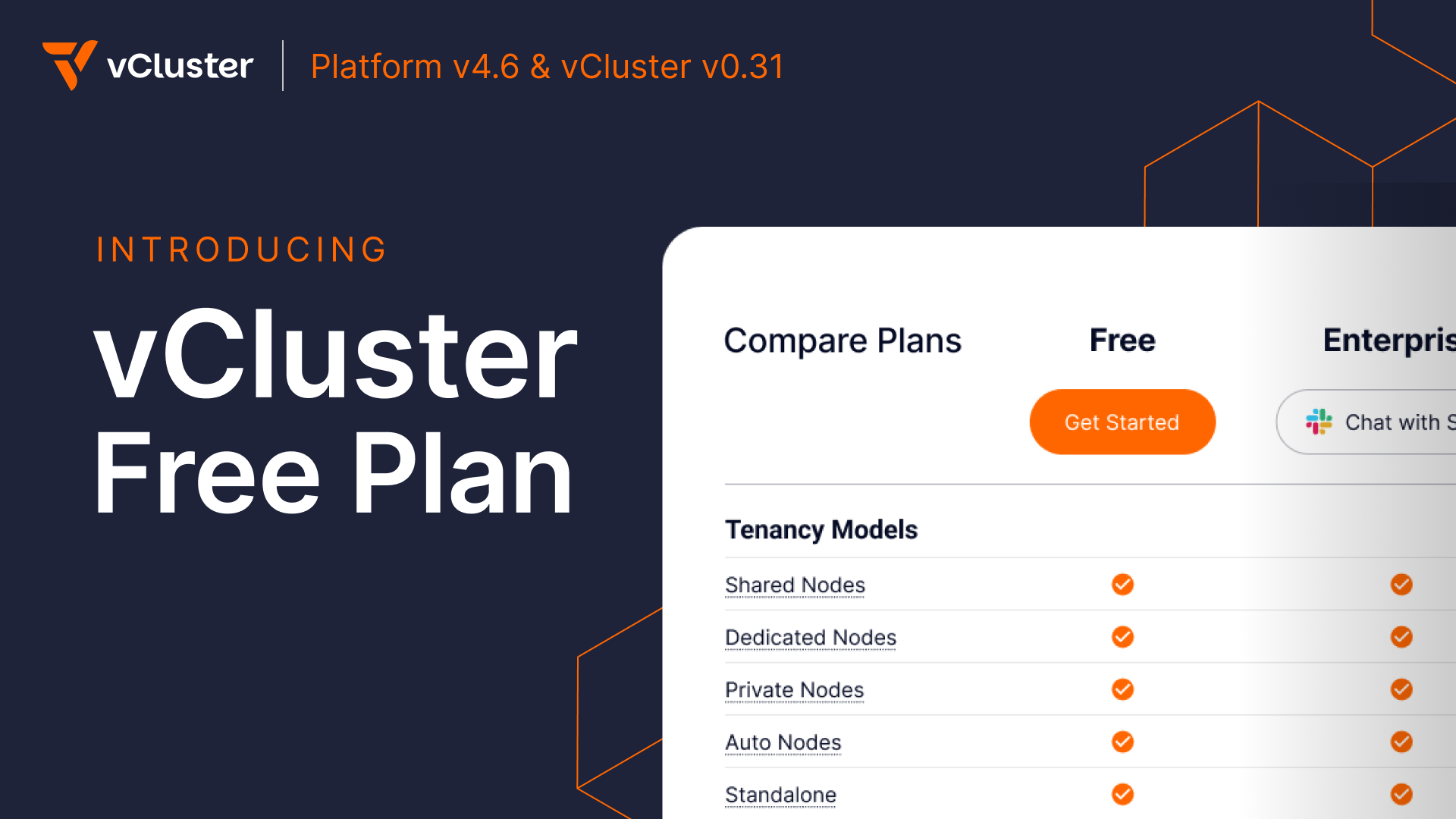
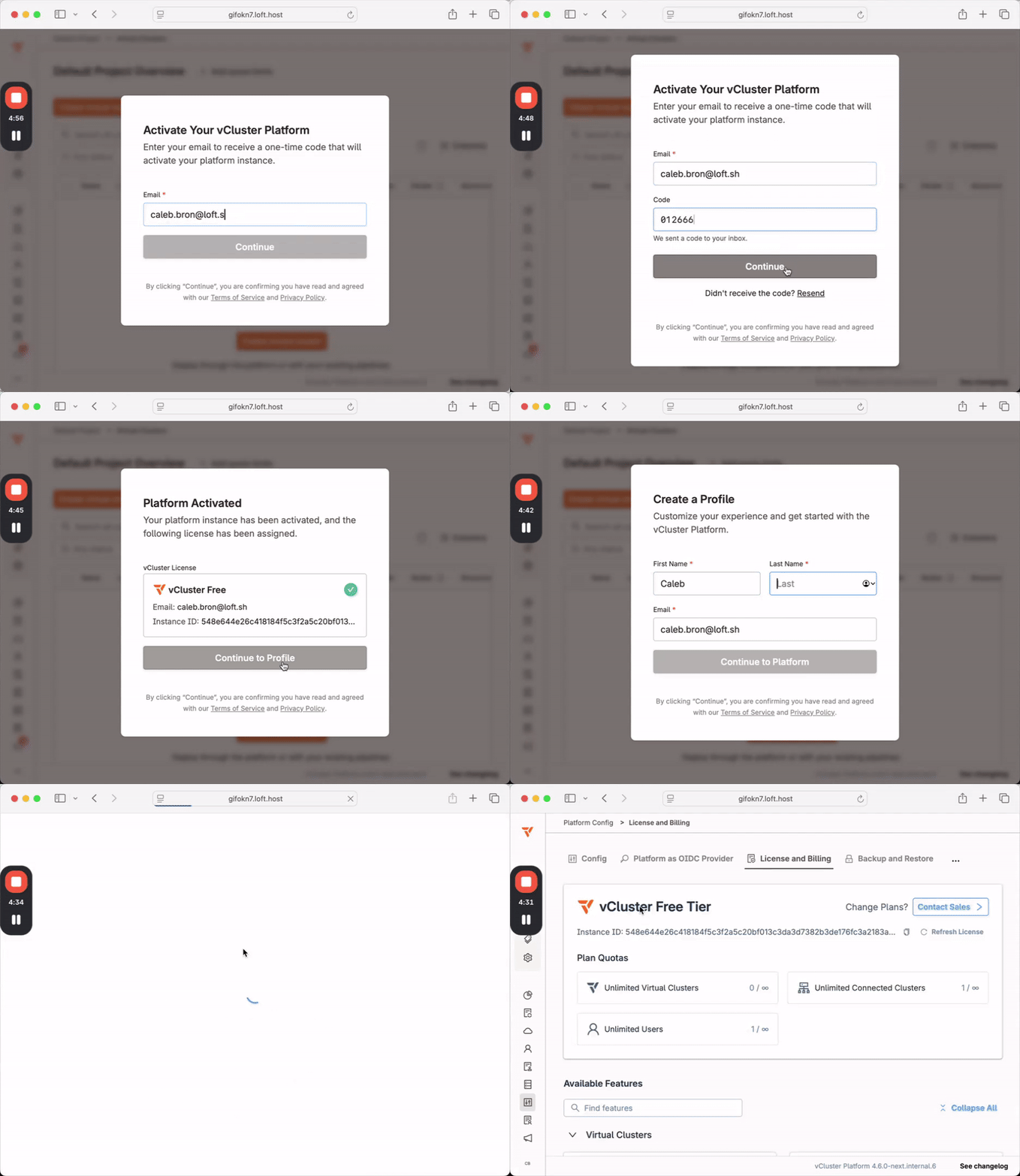
vCluster Platform is a powerful centralized control plane which lets teams securely run virtual clusters and workloads at scale. Previously, installing the Platform automatically started a two week trial on the Enterprise Ultimate tier, limiting usage to a fixed window. This latest set of releases introduces a new Free Tier which allows users to continue using the Platform for an unlimited amount of time. After installing the platform you will see an activation window as shown below:

Previously licensed versions of the Platform or virtual clusters are unaffected, only new installations will require an activation. Please see our blog (todo link) on the topic, and the pricing page for more detailed plan information on what is included in each tier.

vCluster in Docker (vind)

We are excited to introduce a new engine for running Kubernetes locally. Starting in v0.31, the vCluster CLI can spin up lightweight clusters in seconds, simplifying both your development workflow and the underlying stack. Compared with other engines it has several advantages, including the ability to start or stop clusters, and auto-proxying images from the local Docker daemon.

To create a cluster:

vcluster upgrade --version v0.31.0 
vcluster use driver docker 
vcluster create dev

Now you have a running cluster, which can use all the usual commands from the CLI such as:

vcluster list
vcluster connect/disconnect
vcluster delete
vcluster sleep/wakeup

This project is under active development and will get additional enhancements in the near future, including closer integration with other vCluster features. Let us know what you think!

Experimental Resource Proxy

The new experimental resource proxy feature lets a virtual cluster transparently proxy custom resource requests to another “target” virtual cluster, so users keep working as if the CRDs were local while the actual storage and controllers live elsewhere. This is ideal for centralized resource management and cross-cluster workflows, and it stays safe by default: each client virtual cluster only sees the resources it created, with an optional access mode to expose everything when you need it.

Dive into the examples in the docs

Security Advisories

Along with this release we have published two advisories, the first of which is considered a CVE. Please review the following links for more information and mitigation steps.

Other Announcements & Changes

  • The upstream Ingress-nginx project has published plans for its upcoming retirement, and will cease development in March 2026. As of v0.31.0 we are deprecating any ingress-nginx specific use cases or features, such as our chart annotations, or the ability to deploy it via the CLI or platform. Additionally, solutions and examples that feature the ingress-nginx controller project in our docs have been deprecated and will be removed in the future. We will continue to support the use of ingress controllers, and will further address this area in the future.

  • Helm v4 is now supported to deploy our vCluster or Platform charts

  • Istio 1.28 is now supported

  • The vCluster helm chart now includes an optional PodDisruptionBudget.

vCluster Breaking Changes

  • In v0.26 we introduced a feature to auto-repair embedded etcd in specific situations. After further review and testing we have removed this feature, as in certain cases it can cause instability. This removal has been backported to versions: 0.30.2, 0.29.2, 0.28.1, 0.27.2, and 0.26.4.

  • Network Policies have been significantly revised for enhanced security and flexibility, moving beyond the previous, egress-only approach. Additionally, the configuration now mirrors the standard Kubernetes NetworkPolicy specification.

    Enabling policies.networkPolicy.enabled now activates network policies and automatically deploys necessary default ingress and egress policies for vCluster. In comparison with the previous, control plane ingress/egress external traffic is denied by default.

    The configuration now includes distinct sections for granular control to support all tenancy models. Please refer to the docs for details.

For a list of additional fixes and smaller changes, please refer to the release notes:

For detailed documentation and migration guides, visit vcluster.com/docs and vcluster.com/docs/platform.

October 28th, 2025

vCluster

We’re excited to roll out vCluster Platform v4.5 and vCluster v0.30, two big releases packed with features that push Kubernetes tenancy even further.

From hybrid flexibility to stronger isolation and smarter automation, these updates are another step toward delivering the most powerful and production-ready tenancy platform in the Kubernetes ecosystem.

Platform v4.5 - vCluster VPN, Netris integration, UI Kubectl Shell, and more

vCluster VPN (Virtual Private Network)

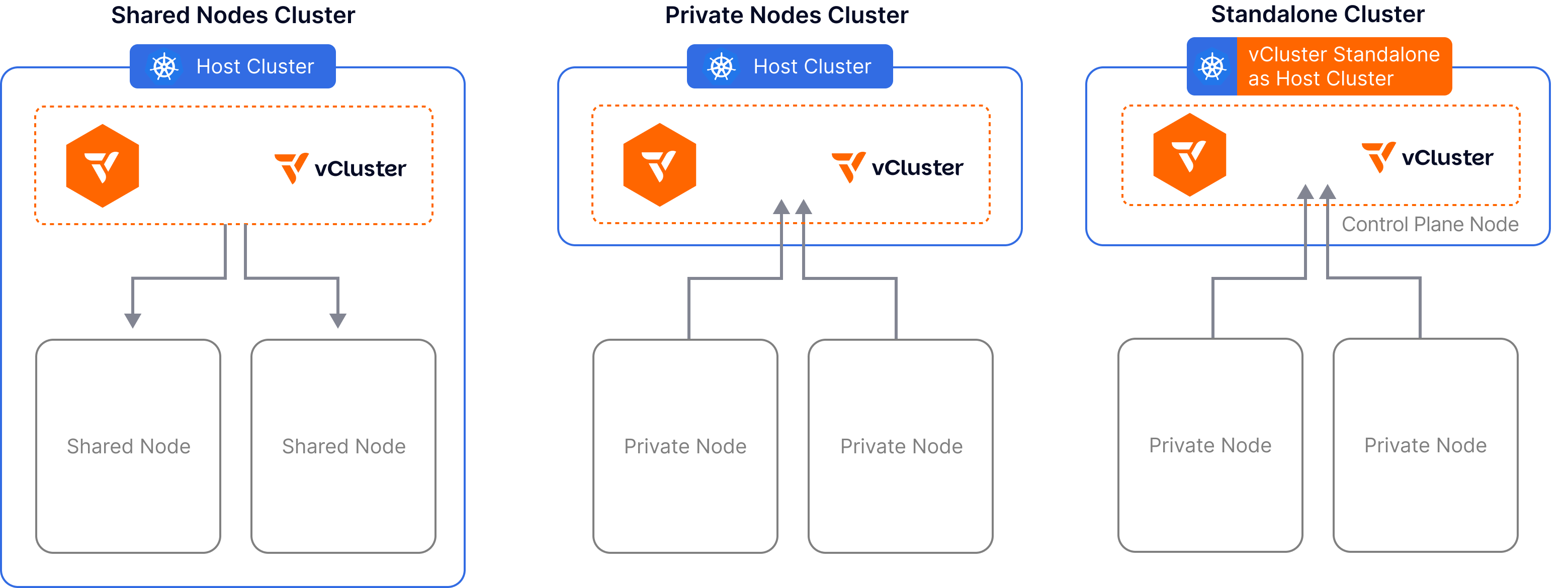
We’ve just wrapped up the most significant shift in how virtual clusters can operate with our Future of Kubernetes Tenancy launch series, introducing two completely new ways of isolating tenants with vCluster Private Nodes and vCluster Standalone.

  • With Private Nodes the control plane is hosted on a shared Kubernetes cluster while worker nodes can be joined directly into a virtual cluster.

  • vCluster Standalone takes this further and allows you to run the control plane on dedicated nodes, solving the “Cluster One” problem.

A networking requirement for both Private Nodes and Standalone is to expose the control plane somehow, typically via LoadBalancers or Ingresses to allow nodes to register themselves. This is easy to do if control plane and nodes are all on the same physical network but gets infinitely harder if they aren’t.

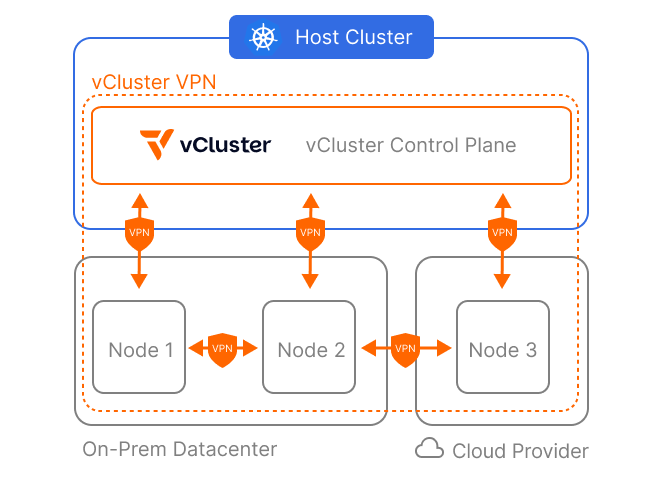
vCluster VPN creates a secure and private connection between the virtual cluster control plane and Private Nodes using the networking technology that is developed by Tailscale. This eliminates the need to expose the virtual cluster control plane directly. Instead, you can create an overlay network for control plane ↔ node and node ↔ node communication.

This makes vCluster VPN perfectly suited for scenarios where you intend to join nodes from different sources. A common challenge of on-prem Kubernetes clusters is providing burst capacity. Auto Nodes and vCluster VPN enable you to automatically provision additional cloud-backed nodes when demand exceeds local capacity. The networking between all nodes in the virtual cluster, regardless of their location, will be taken care of by vCluster VPN.

Let’s walk through setting up a burst-to-cloud virtual cluster:

First, create NodeProviders for your on-prem infrastructure, for example OpenStack, and a cloud provider like AWS.

Next, create a virtual cluster with two node pools and vCluster VPN:

# vcluster.yaml
privateNodes:
	enabled: true
	# Expose the control plane privately to nodes using vCluster VPN
	vpn:
		enabled: true
		# Create an overlay network over all nodes in addition to direct control plane communication
		nodeToNode:
			enabled: true
	autoNodes:
	- provider: openstack
		static:
		# Ensure we always have at least 10 large on-prem nodes in our cluster
		- name: on-prem-nodepool
			quantity: 10 
			nodeTypeSelector:
			- property: instance-type
				value: "lg"
	- provider: aws
		# Dynamically join ec2 instances when workloads exceed our on-prem capacity
		dynamic:
		- name: cloud-nodepool
			nodeTypeSelector:
			- property: instance-type
				value: "t3.xlarge"
			limits:
				nodes: 20 # Enforce a maximum of 20 nodes in this NodePool 

Auto Nodes Improvements

In addition to vCluster VPN, this release brings many convenience features and improvements to Auto Nodes. We're upgrading our Terraform Quickstart NodeProviders for AWS, Azure, and GCP to behave more like traditional cloud Kubernetes clusters by deploying native cloud controller managers and CSI drivers by default.

To achieve this, we're introducing optional NodeEnvironments for the Terraform NodeProvider. NodeEnvironments are created once per provider per virtual cluster. They enable you to provision cluster-wide resources, like VPCs, security groups, and firewalls, and control plane specific deployments inside the virtual cluster, such as cloud controllers or CSI drivers.

Emphasizing the importance of NodeEnvironments, we've updated the vcluster.yaml in v0.30 to allow easy central configuration of environments:

# vcluster.yaml
privateNodes:
	enabled: true
	autoNodes:
	# Configure the relevant NodeProviders environment and NodePools directly
	- provider: aws
		properties:   # global properties, available in both NodeEnvironments and NodeClaims
			region: us-east-1
		dynamic:
		- name: cpu-pool
			nodeTypeSelector:
				key: instance-type
				operator: "In"
				values: ["t3.large", "t3.xlarge"]

IMPORTANT: You need to update the vcluster.yaml when migrating your virtual cluster from v0.29 to v0.30. Please take a look at the docs for the full specification.

UI Kubectl Shell

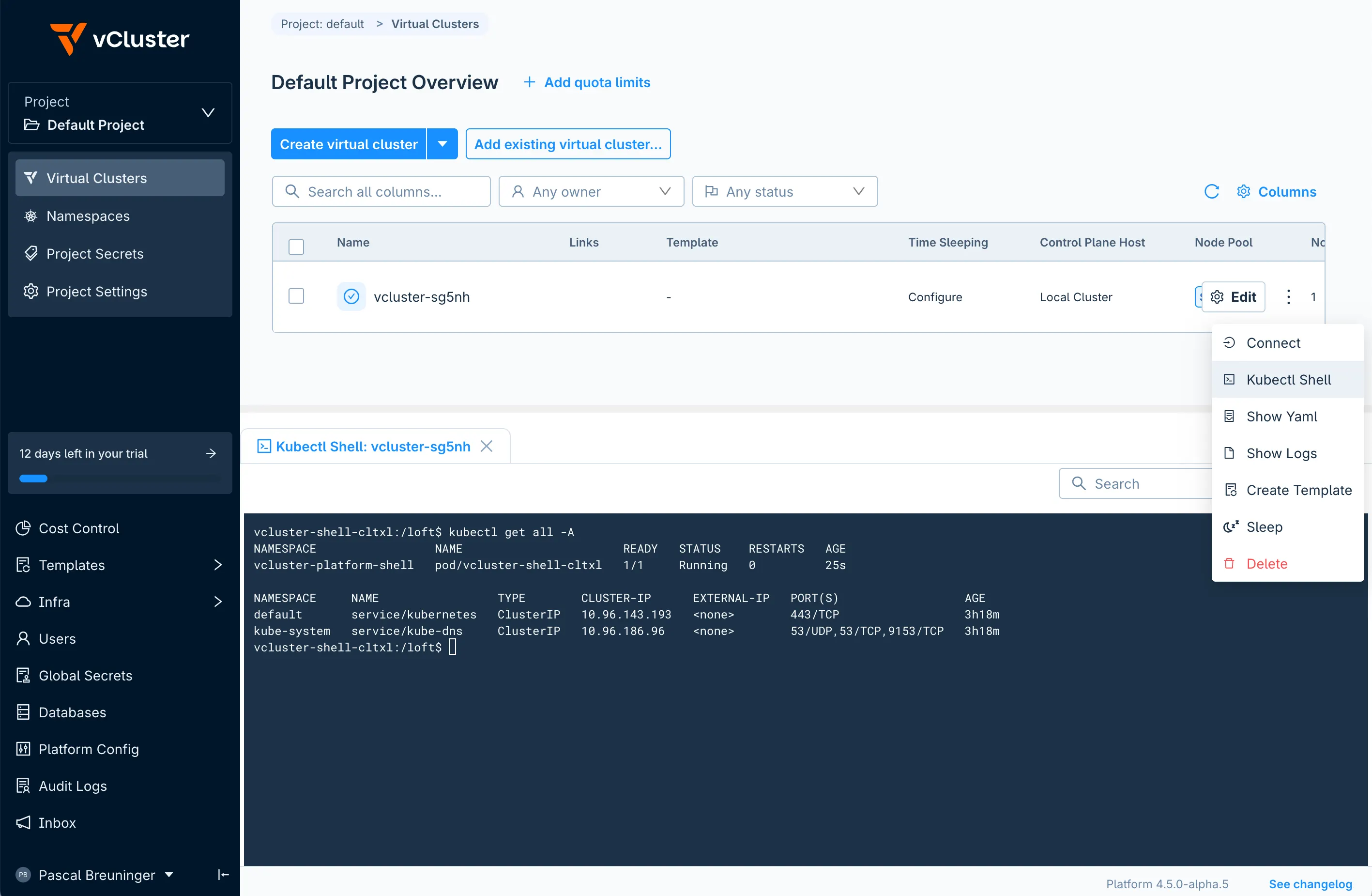
Platform administrators and users alike often find themselves in a situation where they just need to execute a couple of kubectl commands against a cluster to troubleshoot or get a specific piece of information from it. We’re now making it really easy to do just that within the vCluster Platform UI. Instead of generating a new kubeconfig, downloading it, plugging it into kubectl and cleaning up afterwards just to run kubectl get nodes, you can now connect to your virtual cluster right in your browser.

The Kubectl Shell will create a new pod in your virtual cluster with a specifically crafted kubeconfig already mounted and ready to go. The shell comes preinstalled with common utilities like kubectl, helm, jq/yq, curl and nslookup . Quickly run a couple of commands against your virtual cluster and rest assured that the pod will be cleaned up automatically after 15 minutes of inactivity. Check out the docs for more information.

Netris Partnership - Cloud-style Network Automation for Private Datacenters

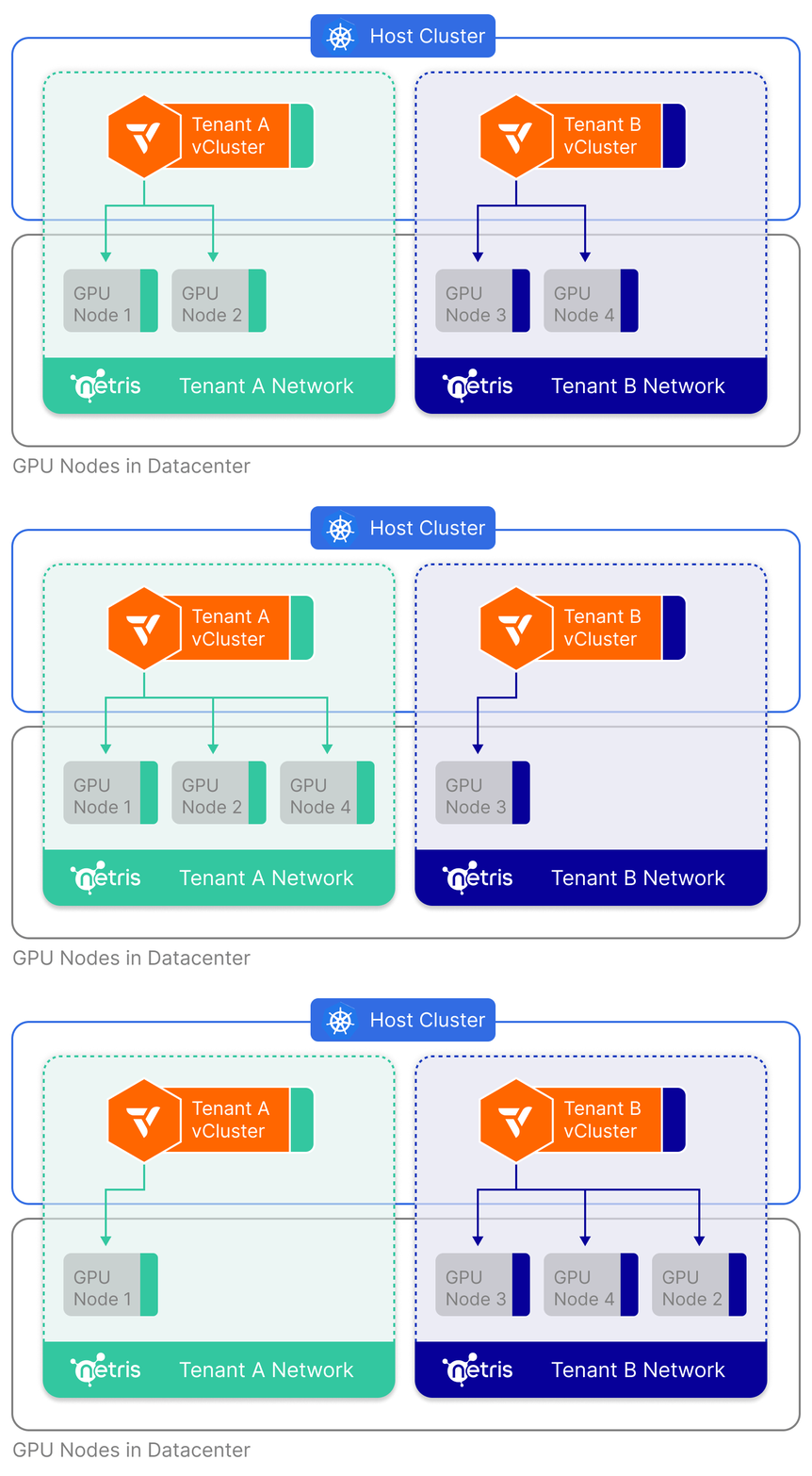
We’re excited to announce our strategic partnership with Netris, the company bringing cloud-style networking to private environments and on-prem datacenters. vCluster now integrates deeply into Netris and is able to provide hard physical tenant isolation on the data plane. Isolating networks is a crucial aspect of clustering GPUs as a lot of the value of GenAI is in the model parameters. The combination of vCluster and Netris allows you to keep data private and still give you the maximum amount of flexibility and maintainability, helping you to dynamically distribute access to GPUs across your external and internal tenants.

Get started by reusing your existing tenant-a-net Netris Server Cluster and automatically join nodes into it by setting up a virtual cluster with this vcluster.yaml:

# vcluster.yaml
integrations:
	# Enable Netris integration and authenticate
	netris:
		enabled: true
		connector: netris-credentials
privateNodes:
	enabled: true
	autoNodes:
	# Automatically join nodes with GPUs to the Netris Server Cluster for tenant A
	- provider: bcm
		properties:
			netris.vcluster.com/server-cluster: tenant-a-net
		dynamic:
		- name: gpu-pool
			nodeTypeSelector: 
			- key: "bcm.vcluster.com/gpu-type"
				value: "h100"

Keep an eye out for future releases as we’re expanding our partnership with Netris. The next step is to integrate vCluster even deeper and allow you to manage all network configuration right in your vcluster.yaml.

Read more about the integration in the docs and our partnership announcement.

Other Announcements & Changes

  • AWS RDS Database connectors are now able to provision and authenticate using workload identity (IRSA and Pod Identity) directly through the vCluster Platform. Learn more in the docs.

Breaking Changes

  • As mentioned above you need to take action when you upgrade Auto Node backed virtual clusters from v0.29 to v0.30. Please consult the documentation.

For a list of additional fixes and smaller changes, please refer to the release notes. For detailed documentation and migration guides, visit vcluster.com/docs/platform.

vCluster v0.30 - Volume Snapshots & K8s 1.34 Support

Persistent Volume Snapshots

In vCluster v0.25, we introduced the Snapshot & Restore feature which allowed taking a backup of etcd via the vCluster CLI, and exporting to locations like S3 or OCI registries. Then in Platform v4.4 and vCluster v0.28 we expanded substantially on that by adding support inside the Platform. This lets users set up an automated system which schedules snapshots on a regular basis, with configuration to manage where and how long they are stored.

Now we are introducing another feature: Persistent Volume Snapshots. By integrating the upstream Kubernetes Volume Snapshot feature, vCluster can include snapshots for persistent volumes which will be created and stored automatically by the relevant CSI driver. When used with the auto-snapshots feature, you will have a recurring stable backup feature that can manage disaster recovery at whatever pace you need it, including your workload’s persistent data.

To use the new feature, first you’ll need to install an upstream CSI driver, and configure a default VolumeSnapshotClass. Then you’ll use the --include-volumes command when running with the CLI:

vcluster snapshot create my-vcluster "s3://my-s3-bucket/snap-1.tar.gz" --include-volumes 

Or if using auto-snapshots you can set the volumes.enabled config to true:

external:
	platform:
		autoSnapshot:
		  enabled: true
			schedule: 0 * * * *
			volumes:
				enabled: true

Now when a snapshot is completed, it will have backed up any volumes that are compatible with the CSI drivers installed in the cluster. These volumes will be stored by the CSI driver in the location of its storage, which is separate from the primary location of your snapshot. For example when using AWS’s EBS-CSI driver, volumes are backed up inside EBS storage, even though the primary snapshot may be in an OCI registry.

To restore, simply add the --restore-volumes param, and the volumes will be re-populated inside the new virtual cluster:

vcluster restore my-vcluster "s3://my-s3-bucket/snap-1.tar.gz" --restore-volumes

Note that this feature is currently in Beta, is not recommended for use in mission-critical environments, and has limitations. We plan to expand this feature over time, so stay tuned for further features and enhancements which will make it usable across an even wider variety of deployment models and infrastructure.

Other Announcements & Changes

  • We have added support for Kubernetes 1.34, enabling users to take advantage of the latest enhancements, security updates, and performance improvements in the upstream Kubernetes release.

  • As Kubernetes slowly transitions from Endpoints to Endpoint Slices, vCluster now supports both. Syncing EndpointSlices to a host cluster can now be done in the same manner as Endpoints.

For a list of additional fixes and smaller changes, please refer to the release notes. For detailed documentation and migration guides, visit vcluster.com/docs.
October 1st, 2025

vCluster

The third, and final release in our Future of Kubernetes Tenancy launch series has arrived, but first let’s recap the previous two installments. Private Nodes and Auto Nodes established a new tenancy model that entirely shifts how vCluster can be deployed and managed:

  • Private Nodes allows users to join external Kubernetes nodes directly into a virtual cluster, ensuring workloads run in a fully isolated environment with separate networking, storage, and compute. This makes the virtual cluster behave like a true single-tenant cluster, removing the need to sync objects between host and virtual clusters.

  • Auto Nodes, built on the open-source project Karpenter, brings on-demand node provisioning to any Kubernetes environment - whether that is in a public cloud, on-premise, bare metal, or multi-cloud. It includes support for Terraform/OpenTofu, KubeVirt, and NVIDIA BCM as Node Providers, making it incredibly flexible. Auto Nodes will rightsize your cluster for you, easing the maintenance burden and lowering costs.

Today’s release yet again expands how vCluster can operate. Up until now, vCluster has always needed a host cluster which it is deployed into. Even with private nodes, the control-plane pod lives inside a shared cluster. For many people and organizations this left a “Cluster One” problem: where and how would they host this original cluster? vCluster Standalone provides the solution to this problem.

Standalone runs directly on a bare metal or VM node, spinning up the control plane and its components as a process running directly on the host using binaries rather than launching the control plane as a pod on an existing cluster. This gives you the freedom and flexibility to install in any environment, without additional vendors.

After an initial control plane node is up, you can easily make the control plane highly available by joining additional control plane nodes to the cluster and enabling embedded etcd across them.

Joining control plane nodes works the same way as joining worker nodes using the private nodes approach for joining nodes. Besides manually adding worker nodes to a Standalone cluster, you can also use Auto Nodes to automatically provision worker nodes on demand.

Let’s look at an example. SSH into the machine you want to use for the first control plane node and create a vcluster.yaml file as shown below. In this case we’ll also enable joinNode to use this host as a worker node in the cluster in addition to being a control plane node:

# vcluster.yaml
controlPlane:
  # Enable standalone
  standalone:
    enabled: true
      # Optional: Control Plane node will also be considered a worker node 
      joinNode:
        enabled: true
# Required for adding additional worker nodes
privateNodes: 
  enabled: true

Now, let’s run this command to bootstrap our vCluster on this node:

sudo su -
export VCLUSTER_VERSION="v0.29.0"
curl -sfL https://github.com/loft-sh/vcluster/releases/download/${VCLUSTER_VERSION}/install-standalone.sh | sh -s -- --vcluster-name standalone --config ${PWD}/vcluster.yaml

A kubeconfig will be automatically configured, so we can directly use our new cluster and check out its nodes:

$ kubectl get nodes

NAME               STATUS   ROLES                  AGE   VERSION
ip-192-168-1-101   Ready    control-plane,master   10m   v1.32.1

That’s it, you now have a new Kubernetes cluster! From here you can join additional worker nodes, or additional control-plane nodes to make the cluster highly available.

To add additional nodes to this cluster, SSH into them and run the node join command. You can generate a node join command by ensuring your current kube-context is using your newly created cluster and then running this command:

# Generate Join Command For Control Plane Nodes (for HA)
vcluster token create --control-plane

# Generate Join Command For Worker Nodes
vcluster token create

To manage or update the vCluster simply adjust /var/lib/vcluster/config.yaml and then restart the vCluster service using this command:

systemctl restart vcluster.service

vCluster Standalone streamlines your infrastructure by removing the need for external providers or distros. It delivers a Kubernetes cluster that is as close to upstream vanilla Kubernetes as possible while adding additional convenience features such as etcd self-healing and others available to any vCluster. Launching a vCluster Standalone cluster allows you to bootstrap the initial cluster required to host your virtual clusters and vCluster Platform but it can also be used to run end-user workloads directly.

See the documentation for further details, full configuration options and specs.

Notable Improvements

Setting new fields via patches

Until now, virtual clusters only supported patching existing fields. With v0.29 we have added functionality to set new fields as well, including conditionally based on an expression. This broadens how pods can interact with existing mechanisms inside the host cluster. For more information see the docs about adding new keys.

Other Announcements & Changes

  • Etcd has been upgraded to v3.6. The upstream etcd docs state that before upgrading to v3.6, you must already be on v3.5.20 or higher, otherwise failures may occur. This version of etcd was introduced in vCluster v0.24.2. Please ensure that you have upgraded to at least that version, before upgrading to v0.29.

  • The External Secret Operator integration configuration was previously reformatted, and the original config options have now been removed. You must convert to the new format before upgrading to v0.29. For more information please see the docs page.

For a list of additional fixes and smaller changes, please refer to the release notes.

This release completes our Future of Kubernetes Tenancy launch series. We hope you’ve enjoyed following us this summer, and experimenting with all the new features we’ve launched. As we head towards fall, we hope to hear more from you, and look forward to speaking directly at the upcoming KubeCon + CloudNativeCon conferences in Atlanta and Amsterdam!

September 9th, 2025

vCluster

vCluster Platform v4.4 - Auto Nodes

In our last release, we announced Private Nodes for virtual clusters, marking the most significant shift in how vCluster operates since its inception in 2021. With Private Nodes, the control plane is hosted on a shared Kubernetes cluster, while worker nodes can be joined directly to a virtual cluster, completely isolated from other tenants and without being part of the host cluster. These nodes exist solely within the virtual cluster, enabling stronger separation and more flexible architecture.

Now, we’re taking Private Nodes to the next level with Auto Nodes. Powered by the popular open-source project Karpenter and baked directly into the vCluster binary, Auto Nodes makes it easier than ever to dynamically provision nodes on demand. We’ve simplified configuration, removed cloud-specific limitations, and enabled support for any environment—whether you’re running in public clouds, on-premises, bare metal, or across multiple clouds. Auto Nodes brings the power of Karpenter to everyone, everywhere.

It’s based on the same open-source engine that powers EKS Auto Mode, but without the EKS-only limitations—bringing dynamic, on-demand provisioning to any Kubernetes environment, across any cloud or on-prem setup. Auto Nodes is easy to get started with, yet highly customizable for advanced use cases. If you’ve wanted to use Karpenter outside of AWS or simplify your setup without giving up power, Auto Nodes delivers.

Auto Nodes is live today—here’s what you can already do:

  1. Set up a Node Provider in vCluster Platform: We support Terraform/OpenTofu, KubeVirt, and NVIDIA BCM.

  2. Define Node Types (use Terraform/OpenTofu Node Provider for any infra that has a Terraform provider, including public clouds but also private cloud environments such as OpenStack, MAAS, etc.) or use our Terraform-based quickstart templates for AWS, GCP and Azure.

  3. Add autoNodes config section to a vcluster.yaml (example snippet below).

  4. See Karpenter in action as it dynamically creates NodeClaims and the vCluster Platform fulfills them using the Node Types available to achieve perfectly right-sized clusters.

  5. Bonus: Auto Nodes will also handle environment details beyond the nodes itself, including setting up LoadBalancers and VPCs as needed. More details in our sample repos and the docs.

# vcluster.yaml with Auto Nodes configured
privateNodes:
	enabled: true
	autoNodes:
		dynamic:
			- name: gcp-nodes
				provider: gcp
				requirements:
					property: instance-type
					operator: In
					values: ["e2-standard-4", "e2-standard-8"]
			- name: aws-nodes
				provider: aws
				requirements:
					property: instance-type
					operator: In
					values: ["t3.medium", "t3.large"]
			- name: private-cloud-openstack-nodes
				provider: openstack
				requirements:
					property: os
					value: ubuntu

Demo

To see Auto Nodes in action with GCP nodes, watch the video below for a quick demo.

Caption: Auto scaling virtual cluster on GCP based on workload demand

Get Started

To harness the full power of Karpenter and Terraform in your environment we recommend to fork our starter repositories and adjust them to meet your requirements.

Public clouds are a great choice for maximum flexibility and scale, though sometimes they aren’t quite the perfect fit. Specially when it comes to data sovereignty, low-latency local compute or bare metal use cases.

We’ve developed additional integrations to bring the power of Auto Nodes to your on-prem and bare metal environments:

  • NVIDIA BCM is the management layer for NVIDIA’s flagship supercomputer offering DGX SuperPOD, a full-stack data center platform that includes industry-leading computing, storage, networking and software for building on-prem AI factories.

  • KubeVirt enables you to break up large bare metal servers into smaller isolated VMs on demand.

Coming Soon: vCluster Standalone

Auto Nodes mark another milestone in our tenancy models journey but we’re not done yet. Stay tuned for the next level to increase tenant isolation: vCluster Standalone.

This deployment model allows you to run vCluster as a binary on a control plane node or a set of multiple control plane nodes for HA similar to how traditional distros such as RKE2 or OpenShift are deployed. vCluster is designed to run control planes in containers but many of our customers face the Day 0 challenge of having to spin up the host cluster to run the vCluster control plane pods on top of. With vCluster Standalone we now answer our customers’ demand for us to help them spin up and manage this host cluster with the same tooling and support that they receive for their containerized vCluster deployments. Stay tuned for this exciting announcement planned for October 1.

Other Changes

Notable Improvements

Auto Snapshots

Protect your virtual clusters with automated backups via vCluster Snapshots. Platform-managed snapshots run on your defined schedule, storing virtual cluster state to S3 compatible buckets or OCI registries. Configure custom retention policies to match your backup requirements and restore virtual clusters from snapshots quickly. Check out the documentation to get started.

In our upcoming releases we will be unveiling more capabilities around adding persistent storage as part of these snapshots but for now this is limited to the control plane state (K8s resources).

Require Template Flow

Improves your tenant self-serve experience in the vCluster Platform UI by highlighting available vCluster Templates in projects. Assign icons to templates and make them instantly recognizable

Read more about projects and self-serving virtual clusters in the docs.

Air-Gapped Platform UI

Air-gapped deployments come with a unique set of challenges, from ensuring you’re clusters are really air tight over pre-populating container images and securely accessing the environment. We’re introducing a new UI setting to give you fine grained control over what external URLs the vCluster Platform UI can access. This helps you to validate that what you see in the web interface matches what your pods can access.

Read more about locking down the vCluster Platform UI.

vCluster v0.28

In parallel with Platform v4.4, we’ve also launched vCluster v0.28. This release includes support for Auto Nodes and other updates mentioned above, plus additional bug fixes and enhancements.

Other Announcements & Changes

  • The Isolated Control Plane feature, configured with experimental.isolatedControlPlane, was deprecated in v0.27, and has been removed in v0.28.

  • The experimental feature Generic Sync has been removed as of v0.28.

  • The External Secret Operator integration configuration has been reformatted. Custom resources have migrated to either the fromHost or toHost section, and the enabled option has been removed. This will clarify the direction of sync, and matches our standard integration config pattern. The previous configuration is now deprecated, and will be removed in v0.29. For more information please see the docs page.

For a list of additional fixes and smaller changes, please refer to the Platform release notes and the vCluster release notes.

What's Next

This release marks another milestone in our tenancy models journey. Stay tuned for the next level to increase tenant isolation: vCluster Standalone.

For detailed documentation and migration guides, visit vcluster.com/docs.
August 11th, 2025

vCluster

The first installment of our Future of Kubernetes launch series is here, and we couldn’t be more excited. Today, we introduce Private Nodes, a powerful new tenancy model that gives users the option to join Kubernetes nodes directly into a virtual cluster. If you use this feature, it means that all your workloads will run in an isolated environment, separate from other virtual clusters, which produces a higher level of security and avoids potential interference or scheduling issues. In addition, when using private nodes, objects no longer need to be synced between the virtual and host cluster. The virtual cluster behaves closer to a traditional cluster: Completely separate nodes, separate CNI, separate CSI, etc. A virtual cluster with private nodes is effectively an entirely separate single-tenant cluster itself. The main difference to a traditional cluster remains the fact that the control plane runs inside a container rather than as a binary directly on a dedicated control plane master node.

This is a giant shift in how vCluster can operate, and it opens up a host of new possibilities. Let’s take a high-level look at setting up a virtual cluster with private nodes. For brevity, only partial configuration is shown here.

First, we enable privateNodes in the vcluster.yaml:

privateNodes: 
  enabled: true 

Once created, we join our private worker nodes to the new virtual cluster. To do this, we need to follow two steps:

  1. Connect to our virtual cluster and generate a join command:

vcluster connect my-vcluster 
# Now within the vCluster context, run: 
vcluster token create --expires=1h 
  1. Now SSH into the node you would like to join as a private node and run the command that you received from the previous step. It looks similar to this command:

curl -sfLk https://<vcluster-endpoint>/node/join?token=<token> | sh - 

Run the above command on any node and it will join the cluster — that’s it! The vCluster control-plane can also manage and automatically upgrade each node when the control plane itself is upgraded, or you can choose to manage them independently.

Please see the documentation for more information and configuration options.

Coming Soon: Auto Nodes For Private Nodes

Private Nodes give you isolation but we won’t stop there. One of our key drivers was always to make Kubernetes architecture more efficient and less wasteful on resources. As you may notice, Private Nodes allows you now to use vCluster for creating single-tenant clusters which might increase the risk for underutilized nodes and wastes resources. That’s why we’re working on an even more exciting feature that builds on top of Private Nodes: We call it Auto Nodes.

With the next release, vCluster will be able to dynamically provision private nodes for each virtual cluster using a built-in Karpenter instance. Karpenter is the open source Kubernetes node autoscaler developed by AWS. With vCluster Auto Nodes, your virtual cluster will be able to scale on auto-pilot just like EKS Auto Mode does in AWS but it will work anywhere, not just in AWS with EC2 nodes. Imagine auto-provisioning nodes from different cloud providers, in your private cloud and even on bare metal.

Combine Private Nodes and Auto Nodes, and you get the best of both worlds: maximum hard isolation and dynamic clusters with maximum infrastructure utilization, backed by the speed, flexibility, and automation benefits of virtual clusters — all within your own data centers, cloud accounts and even in hybrid deployments.

To make sure you’re the first the know once Auto Nodes will be available, subscribe to our Launch Series: The Future of Kubernetes Tenancy.

Other Changes

Notable Improvements

  • Our CIS hardening guide is now live. Based on the industry-standard CIS benchmark, this guide outlines best practices tailored to vCluster’s unique architecture. By following it, you can apply relevant controls which improve your overall security posture, and can better align with security requirements.

  • The vCluster CLI now has a command to review and rotate certificates. This includes the client, server, and CA certificates. Client certificates only remain valid for 1 year by default. See the docs or vcluster certs -h for more information. This command already works with private nodes but requires additional steps.

  • We have added support for Kubernetes 1.33, enabling users to take advantage of the latest enhancements, security updates, and performance improvements in the upstream Kubernetes release.

Other Announcements & Changes

  • Breaking Change: The sync.toHost.pods.rewriteHosts.initContainer configuration has been migrated from a string to our standard image object format. This only needs to be addressed if you are currently using a custom image. Please see the docs for more information.

  • The Isolated Control Plane feature, configured with experimental.isolatedControlPlane has been deprecated as of v0.27, and will be removed in v0.28.

  • In an upcoming minor release we will be upgrading etcd to v3.6. The upstream etcd docs state that before upgrading to v3.6, you must already be on v3.5.20 or higher, otherwise failures may occur. This version of etcd was introduced in vCluster v0.24.2. Please ensure you plan to upgrade to, at minimum, v0.24.2 in the near future.

  • The External Secret Operator integration configuration has been reformatted. Custom resources have migrated to either the fromHost or toHost section, and the enabled option has been removed. This will clarify the direction of sync, and matches our standard integration config pattern. The previous configuration is now deprecated, and will be removed in v0.29. For more information please see the docs page.

  • When syncing CRDs between the virtual and host clusters, you can now specify the API Version. While not a best-practice, this can provide a valuable alternative for specific use-cases. See the docs for more details.

For a list of additional fixes and smaller changes, please refer to the release notes.

July 30th, 2025

vCluster

We’re entering a new era of platform engineering, and it starts with how you manage Kubernetes tenancy.

vCluster is evolving into the first platform to span the entire Kubernetes tenancy spectrum. From shared cluster namespaces to dedicated clusters with full isolation, platform teams will be able to tailor tenancy models to fit every workload, without cluster sprawl or performance trade-offs.

From August through October, we’re rolling out a series of powerful releases that bring this vision to life:

  • August 12 — v0.27 Private Nodes: Complete isolation for high-performance workloads

  • September 9 — v0.28 Auto Nodes: Smarter scaling for tenant-dedicated infrastructure

  • October 1 — v0.29 Standalone vCluster: No host cluster required

Declarative. Dynamic. Built for platform teams who want control without complexity. With each release, we’re unlocking new layers of flexibility, isolation, and performance across the full tenancy spectrum.

👉 Don’t miss a drop. Sign up for announcements

June 26th, 2025

vCluster

Our newest release provides two new features to make managing and scheduling workloads inside virtual clusters even easier, along with several important updates.

Namespace Syncing

In a standard vCluster setup, when objects are synced from the virtual cluster to the host cluster their names are translated to ensure no conflicts occur. However some use cases have a hard requirement that names and namespaces must be static. Our new Namespace Syncing feature has been built specifically for this scenario. The namespace and any objects inside of it will be retained 1:1 when synced from the virtual cluster context to the host cluster if they follow user-specified custom mapping rules. Let’s look at an example:

sync:
  toHost:
    namespaces:
      enabled: true 
      mappings:
        byName:
          "team-*": "host-team-*"

If I use the vcluster.yaml shown above and then create a namespace called team-one-application, it will be synced to the host as host-team-one-application. Any objects inside of this namespace which have toHost syncing enabled will then be synced 1:1 without changing the names of these objects. This allows users to achieve standard naming conventions for namespaces no matter the location, allowing for an alternative way of operating virtual clusters.

Several other configurations, patterns, and restrictions exist. Please see the documentation for more information. Also note that this feature replaces the experimental multi-namespace-mode feature with immediate effect.

Hybrid-Scheduling

Our second headline feature focuses on scheduling. Currently we allow scheduling using the host or virtual scheduling, but not both at the same time. This was restrictive for users who wanted a combination of both, allowing a pod to be scheduled by a custom scheduler on either the virtual cluster or the host, or falling back to the host. Enter hybrid-scheduling:

sync:
  toHost:
    pods:
      hybridScheduling:
        enabled: true
        hostSchedulers:
        - kai-scheduler

The above config informs vCluster that if a pod would like to use the kai-scheduler, it exists on the host cluster, and will be forwarded to it. Any specified scheduler not listed in the config is assumed to be running and operating directly inside the virtual cluster and pods remain pending there to be scheduled before being synced to the host cluster.

Finally any pod which does not specify a scheduler will use the host’s default scheduler. Therefore if a new custom scheduler is needed, you only need to deploy the scheduler inside the virtual cluster and set its name on the pod spec:

apiVersion: v1
kind: Pod
metadata:
  name: server
spec:
  schedulerName: my-new-custom-scheduler

Alternatively if the virtual scheduler option is enabled, the virtual cluster’s default scheduler will be used instead of the hosts, which means all scheduling will occur inside the virtual cluster. Note that his configuration has moved from advanced.virtualScheduler to controlPlane.distro.k8s.scheduler.enabled .

This feature and it’s various options give greater scheduling freedom to both users who only have access to the virtual cluster and to platform teams who would like to extend certain schedulers to their virtual clusters.

Other Changes

Notable Improvements

  • Class objects synced from the host can now be filtered by selectors or expressions. More notably, they are now restricted based on that filter. If a user attempts to create an object referencing a class which doesn’t match with the selectors or expressions, meaning it was not imported into their virtual cluster, then syncing it to the host will now fail. This includes ingress-class, runtime-class, priority-class, and storage-classes.

  • Our embedded etcd feature will now attempt to auto-recover in situations where possible. For example if there are three etcd-nodes and one fails, but there are still two to maintain quorum, the third node will be auto-replaced.

Breaking Changes

  • The k0s distro has been fully removed from vCluster. See the announcement in our v0.25 changelog for more information.

  • As noted above, the experimental multi-namespace-mode feature has been removed.

Fixes & Other Changes

  • Please note that the location of the config.yaml in the vCluster pod has moved from /var/vcluster/config.yaml to /var/lib/vcluster/config.yaml.

  • v0.25 introduced a slimmed down images.txt asset on the release object, with a majority of images moving into images-optional.txt In v0.26 we have additionally moved etcd, alpine, and k3s images into the optional list, leaving the primary list as streamlined as possible.

  • The background-proxy image can now be customized, as well as the syncer’s liveness and readiness probes.

  • Several key bugs have been fixed, including issues surrounding vcluster connect, creating custom service-cidrs, and using vcluster platform connect with a direct cluster endpoint.

For a list of additional fixes and smaller changes, please refer to the release notes.

June 3rd, 2025

vCluster

vCluster Platform v4.3 brings powerful new capabilities across scalability, cost efficiency, and user experience—making it easier than ever to run, manage, and optimize virtual clusters at scale.

External Database Connector - Support for Postgres and Aurora and UI support

Virtual clusters always require a backing store. If you explore vCluster with the default settings and in the most lightweight form possible, your virtual clusters’ data is stored in a SQLite database which is a single-file database that is typically stored in a persistent volume mounted into your vCluster pod. However, for users that want more scalable and resilient backing stores, vCluster also supports:

  • etcd (deployed outside of your virtual cluster and self-managed)

  • Embedded etcd (runs an etcd cluster as part of your virtual cluster pods fully managed by vCluster)

  • External databases (MySQL or Postgres databases)

  • External database connector (MySQL or Postgres database servers including Amazon Aurora

In v4.1, we introduced the External Database Connector feature with only MySQL support, but now we’ve extended support for Postgres database servers. We have also introduced a UI flow to manage your database connectors and select them directly when creating virtual clusters.

If you want to learn more about External Database Connectors, view the documentation.

UI Updates

There have been major refreshes in different parts of our UI to help the user experience. The navigation has been updated to quickly find project settings and secrets, but to also allow customization of the colors of the platform.

Permission Management

Admins can now take advantage of the new permission page to easily view in one source all the permissions granted to the user or team. From this view, it’s also easy to add or edit permissions in one central location.

In addition to the new permission page, the pages to create and edit users, teams and global roles have all been updated to improve the experience of creating those objects.

New Pages for vCluster and vCluster Templates

Creating virtual clusters or virtual cluster templates from the platform has always been critical in quick and easy virtual cluster creation. With vCluster v0.20, the vcluster.yaml has become the main configuration file and in vCluster Platform we have introduced an easy way to edit the file as well as use UI to populate/create the file.

Cost Control

In v4.2, we introduced a cost savings dashboard. In this release, the metrics and queries collection were re-formatted for better performance and maintenance. Note: with these changes, all metrics collection will be reset upon upgrading.

Sleep Mode Support for vCluster v0.24+

In vCluster v0.24, we introduced the ability to sleep virtual clusters directly in the vcluster.yaml. In previous versions of the platform, that feature of vCluster was not compatible with the platform and those values were not accounted. Now, when a virtual cluster is using sleep mode, the platform will read the configuration and if the agent is deployed on the host cluster, it takes over managing sleep mode as if it had been configured for the platform.

For a list of additional fixes and smaller changes, please refer to the release notes.

May 14th, 2025

vCluster

Our newest release of vCluster includes a boatload of new features, updates, and some important changes. Foremost, we are excited to announce our integration with Istio!

Istio Integration

Istio has long been a cornerstone of service-mesh solutions within the CNCF community, and we are thrilled to introduce an efficient solution built directly into vCluster. This integration eliminates the need to run separate Istio installations inside each virtual cluster. Instead it enables all virtual clusters to share a single host installation, creating a simpler and more cost-effective architecture that is easier to maintain.

Our integration works by syncing Istio’s DestinationRules, VirtualServices, and Gateways from the virtual cluster into the host cluster. Any pods created in a virtual-cluster namespace labeled with istio.io/dataplane-mode will have that label attached when they are synced to the host cluster. And finally a Kubernetes Gateway resource is automatically deployed to the virtual-clusters host namespace in order to be used as a Waypoint proxy. Pods will then be automatically included in the mesh.

integrations:
  istio:
    enabled: true

Please note that the integration uses Ambient mode directly, and is not compatible with sidecar mode. See the Istio Integration docs for more info, pre-requisites, and configuration options.

Support for Istio in Sleep Mode

Along with our Istio integration comes direct-support with our vCluster-native workload sleep feature. Once the Istio integration is set up on the virtual cluster, and Sleep Mode is enabled, workloads that aren’t receiving traffic through the mesh can be automatically spun down, and once traffic is received they will scale back up again. This allows for an Istio-only ingress setup, one which doesn’t use a standard operator such as ingress-nginx, to take advantage of our Sleep Mode feature.

See the docs for more information on how this can be configured. In many cases it will be as simple as the following:

sleepMode:
  enabled: true
  autoSleep:
    afterInactivity: 30s
integrations:
  istio:
    enabled: true

Notable changes and improvements

vCluster K8s Distribution Deprecations and Migration Path

Due to the complications of maintaining and testing across several Kubernetes distributions, and their divergence from upstream, both k0s and k3s are now deprecated as vCluster control plane options in v0.25. This leaves upstream Kubernetes as the recommended and fully supported option. In v0.26 k0s will be removed, however k3s will remain as an option for some time in order to give users a chance to migrate to upstream Kubernetes.

To assist with this change, we have added another way to migrate from k3s to k8s, beyond our recent Snapshot&Restore feature which was released in v0.24. This new feature allows changing just the vcluster.yaml, see the docs for more details.

Starting with a k3s vCluster config:

controlPlane:
  distro:
    k3s:
      enabled: true

You can now simply update that distro config to use k8s instead, and then upgrade:

controlPlane:
  distro:
    k8s:
      enabled: true

Please be aware that this only works for migrating from k3s to k8s, and not the other way around.

InitContainer and Startup changes

Our initContainer process has been revamped to use a single image, as opposed to three. This not only simplifies the config.yaml around custom control-plane settings, but will lower startup time by a significant margin. See the PR for further information.

This will be a breaking change if any custom images were used, specifically under the following paths, but note that others like extraArgs or enabled are not changing:

controlPlane:
  distro:
    k8s:
      controllerManager: ...
      scheduler: ...
      apiServer: ...
        image:
          tag: v1.32.1

All three images can now be set from a single variable:

controlPlane:
  distro:
    k8s:
      image:
        tag: v1.32.1

Images.txt and Images-optional.txt updates for custom registries

The images.txt file is generated as an asset on every vCluster release to facilitate the AirGap registry process, and is also useful for informational purposes. However in recent releases the file was getting overly long and convoluted. This can lead to a substantial amount of unnecessary bandwidth and hassle for users who migrate every image to their private registry.

Starting in v0.25 the file will be renamed to vcluster-images.txt and only contain the latest version of each component. Second, a new images-optional.txt will be added to the assets, and this will contain all additional possible component images. This will make first-time installs much easier, and allow current users to select only the images they need. Finally, unsupported Kubernetes versions have been removed, which further reduced the size of the file.

Update to database connector in vcluster.yaml required

If using an external database connector or external datasource in version v0.24.x or earlier, configuration was possible without using the enabled flag:

controlPlane:
  backingStore:
    database:
      external:
        connector: test-secret
        --or--
        datasource: "mysql://root:password@tcp(0.0.0.0)/vcluster"

Before upgrading or starting a v0.25.0 virtual cluster, you must also set enabled: true, otherwise a new sqlite database will be used instead. See this issue for more details and updates in the future.

controlPlane:
  backingStore:
    database:
      external:
        enabled: true # required
        connector: test-secret

Other Changes

Fixes & Other Changes

  • As stated in our v0.23 announcement, deploying multiple virtual clusters per-namespace has been deprecated. When using v0.25 and beyond, the virtual cluster pod will no longer start.

  • Some commands or configurations, such as using the patches feature, were not correctly checking for licensing on command execution, instead only erroring out in the logs. Those have been moved to command execution, so that any issues with licensing can be quickly surfaced and resolved.

For a list of additional fixes and smaller changes, please refer to the release notes.

April 1st, 2025

vCluster

Today, we’re happy to announce our Open Source vCluster Integration for Rancher. It allows creating and managing virtual clusters via the Rancher UI in a similar way as you would manage traditional Kubernetes clusters with Rancher.

Why we built this

For years, Rancher users have opened issues in the Rancher GitHub repos and asked for a tighter integration between Rancher and vCluster. At last year’s KubeCon in Paris, we took the first step to address this need by shipping our first Rancher integration as part of our commercial vCluster Platform.

Over the past year, we have seen many of our customers benefit from this commercial integration but we also heard from many vCluster community users that they would love to see this integration as part of our open source offering. We believe that more virtual clusters in the world are a net benefit for everyone: happier developers, more efficient infra use, less wasted resources and less energy consumption leading to a reduced strain on the environment. Additionally, we realized that rebuilding our integration as a standalone Rancher UI extension and a lightweight controller for managing virtual clusters would be even easier to install and operate for Rancher admins. So, we decided to just do that and design a new vCluster integration for Rancher from scratch.

Anyone operating Rancher can now offer self-service virtual clusters to their Rancher users by adding the vCluster integration to their Rancher platform. See the gif below for how this experience looks from a user’s perspective.

How the new integration works

Using the integration requires you to take the following steps:

  1. Have at least one functioning cluster running in Rancher which can serve as the host cluster for running virtual clusters in.

  2. Installing the two parts of the vCluster integration inside Rancher

    1. Our lightweight operator

    2. Our Rancher UI extension

  3. Granting users access to a project or namespace in Rancher, so they can deploy a virtual cluster in there. That’s it!

Under the hood, when users deploy a virtual cluster via the UI extension, we’re deploying the regular vCluster Helm chart and the controller will automatically detect any virtual cluster (whether deployed via the UI, Helm, or otherwise) and connect them as clusters in Rancher, so users can manage these virtual clusters just like they would manage any other cluster in Rancher.

Additionally, the controller takes care of permissions: any members of the Rancher project that the respective virtual cluster was deployed into will automatically be added to the new Rancher cluster by configuring Rancher’s Roles.

And that’s it. No extra work, no credit card required. You have a completely open-source and free solution for self-service virtual clusters in Rancher. As lightweight and easy as self-service namespaces in Rancher but as powerful as provisioning separate clusters for your users.

Next Steps

In the long run, we plan to migrate users of our previous commercial Rancher integration to the new OSS integration but for now, there are a few limitations that still need to be worked on in the OSS integration in order to achieve feature parity. One important piece is the sync between projects and project permissions in Rancher and projects and project permissions in the vCluster Platform. Another one is the sync of users and SSO credentials. We’re actively working on these features. Subscribe to our changelog and you’ll be the first to know when we’ll have all of this ready for you to use.

Please note that deploying both plugins at the same time is not supported, as they are not compatible with each other.

For further installation instructions see the following: